zed.0xff.me
Alchemy for iPhone!
Long waited for, Alchemy for iPhone is finally out!
Links: ★ iTunes Preview ★ original tweet ★
Screenshots & QR:
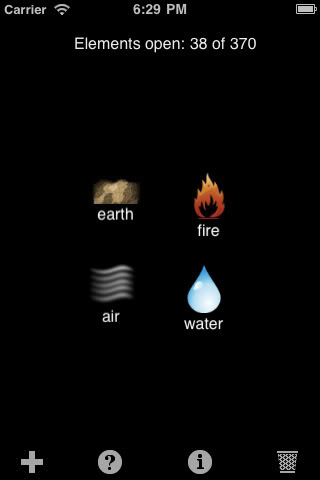
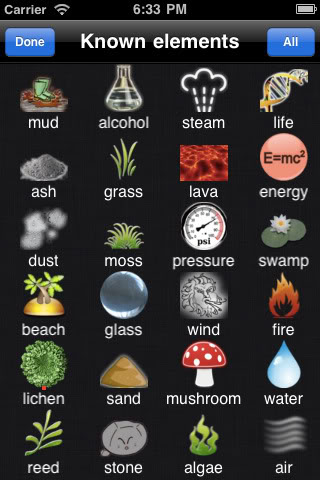
IMPORTANT UPDATE:
if you discovered a bug or game is not working for you – please leave a comment with bug description and your phone model + iOS version. Thank you!
Looking for more? Head on over to the archives.
Post a comment
Pages
Donate
| поддержать автора |
|
|
Categories
- linux
- rails
- gentoo
- android
- ruby
- alchemy
- freebsd
- patch
- полезняшки
- scripts
- netgraph
- rspec
- xorg
- подводные камни
- extension
- x40
- c
- iphone
- isp
- ibm
- rails3
- bugs
- wndr3700
- firefox
- netflow
- openwrt
- ng_netflow
- spam
- жесть
- халява
- lltd
- vimeo
- iptv
- bisect
- bug
- ructf
- acpi
- notebook
- games
- ec2
- binary
- elements
- tablet
- galaxy tab
- samsung
- opensource
- github
- pascal
- ami
- amazon
- sony
- java
- proguard
- howto
- webmoney
- memory leaks
- SyncML
- vaio
- file compare
- mysql
- хозяйке на заметку
- fork
- magenta
- fc
- blog
- awesome
- edge
- passenger
- thin
- mongrel
- ruby19
- nginx
- dellmgr
- вредные советы
- smtp
- sasl
- postfix
- wave
- upgrade
- ipad
- ng_sbinat
- release
- php
- 2gis
- mc
- honeypot
- appstore
- костыли
- kde
- consolekit
- ipod
- gems
- Яндекс.Метрика
- yandex.metrika
- gem
- windows
- sane
- scanner
- глюки
- utf8
- proftpd
- gimp
- ideas
- habr
- glossy
- buttons
- ObjC
- UIGlassButton
- flv
- hack.lu
- ctf
- nemerge
- cisco
- multicast
- vlc
- lobotomy
- работа
- tricks
- orbitel crm
- crm
- optimus mini three
- optimus
- rss
- feedburner
- writeup
- airprint
- canon
- mf4010
- mf4018
- cups
- osx
- psi
- debug sessions
- caching
- intel
- raid
- radare2
- hacks
- multilib
- amd64
- malware
- trojan
- dwarf fortress
- boot
- coding
- DoS
- grub2
- newbies
- usb
zed.0xff.me © Andrey "Zed" Zaikin. Powered by .
May 21, 2011 at 7:15 AM
I have downloades this app for my iPod touch 3G (i have just opdated ny iPod to version 4). It does not work, when i open the game, it just shows a black screen without any options, and several seconds later, it returns to my springboard.
May 21, 2011 at 8:27 AM
Don't work on IPhone 3G iOS 3.1.3
May 21, 2011 at 12:05 PM
I have the same probléme with my iphone 3G V4.2.1
May 22, 2011 at 3:11 AM
I have an iTouch 2nd generation IOS 4.2.1 and I wanted to have a competition with my 2 friends and I downloaded the app perfectly fine, but it won't open. It will go black like it's about to open, then it will go back to home screen after about 20 seconds. Please fix! I really want to play! Fix it fix it fix it soon!
May 22, 2011 at 3:27 AM
I can't play it on my ipad (ios 3.2.2)
May 22, 2011 at 5:33 AM
In a few days I'll get some devices for test and will fix the bugs.
Thank you for reports.
May 23, 2011 at 1:14 AM
I have the first gen iPod touch with iOS 4.2.1 and it just opens to the black screen with the iPod heading with battery and such. Please fix
May 23, 2011 at 2:37 AM
yay!!! I played this on my Android device and was sad that it wasn't available for iPhone when I switched phones. A question I had:
Where are preferences? I keep making duplicate elements (they don't show up on my list). I remember there being an option to not create an element again once you've created it. Also, being able to add multiple elements from the "known elements" screen; right now you have to add one at a time.
thank you so much! I am so stoked to be able to play this game again!
May 23, 2011 at 2:38 AM
P.S. I have the iPhone 4, running OS 4.2.8. Runs great!
May 23, 2011 at 4:08 AM
I have an iPod touch 2nd generation and I wanted to play this version of alchemy and it downloaded fine, but when I opened it it gave me a black screen and then went back to my home screen. I'm not sure what iOS I have though.
Thanks.
May 23, 2011 at 7:12 AM
Hey Zed. First of all, I'd like to thank you for finally releasing your version of Alchemy for the iPhone because the similar app of Alchemy had a bad interface and limited elements. Secondly, I downloaded your version about a minute ago and it's not loading for me. The screen goes black for 20 seconds then returns to the homepage. I have the original iPhone with iOS 3.1.3. I hope you can fix the problem soon. I am looking forward to playing soon.
Thank you,
Suraj.
May 24, 2011 at 3:13 PM
Hello!
I have Ipod Touch and I downloaded the game from appstore. But when I try ro open the game it just shows black screen with clock and battery in the top of the screen. After about 10 seconds it just goes back to main menu.
May 25, 2011 at 7:26 AM
Alchemy is not running for me, I have an iPhone 2G running 3.1.2. Hoping the update for 3.1.3 will fix it for 3.1.2 too, as I played it today on my friend's HTC and it was so fun!
May 25, 2011 at 5:01 PM
This aplication doesn't work in my ipod touch 2nd generation version 4.2.1 When i try to open this app.the sreen goes black and then the ipod goes to the main screen
May 26, 2011 at 3:13 PM
А как сделать русский язык для игры на айфоне, а то задолбали игры с английским ((((
May 27, 2011 at 2:36 PM
I have an iPod touch 2g iOS version 4.1.2. Every time I open the app it sits at a black screen for a minute, then crashes.
May 27, 2011 at 5:35 PM
Sorry my iOS version is 4.2.1
May 27, 2011 at 10:01 PM
I have an iPod touch 4G running iOS 4.3.1 and about 4 out of 5 times I select an individual element from the element selection screen, the workspace will reset itself and show water, earth, fire, and air. The app also behaves very slowly after I have more than 7 elements in my workspace at a time. It would be great if you could fix this bug and also be able to search for elements you have already unlocked like you can on the Android version of the app. Thanks!
May 27, 2011 at 10:12 PM
Same as first comment from Unknown it doesnt work
May 27, 2011 at 10:18 PM
Sorry 4.2.1 iOS and gen
May 29, 2011 at 10:47 AM
I have iPod Touch 1st generation and iOS 3.13 and this app doesnt work :(
There's just a black screen and after a while it goes back to my home screen...
I hope you can fix it!
June 01, 2011 at 2:58 AM
I have a 4th gen iPod. Once in a while the items on my expirimental screen will dissapear after grabbing more supplies in the other menu. Or, they will be replaced by the four default elements.
Oh, and the items in the "supply" menu aren't organized in any fashion (I hear that on the android app they're alphabetical). It would be completely awesome if this would change.
This is a really enjoyable app nonetheless. Thank you for living. :)
June 02, 2011 at 3:44 PM
iPhone 4 - iOS 4.0.1
Great app, but... when selecting the "+" to add more elements it frequently locks up. The only way to get it running again is to restart the device.
It has also on a couple of occassions crashed so badly it has forced a device restart automatically. No other app I have installed has ever done anything like that!
June 02, 2011 at 7:00 PM
this app won't even download I put my login in and it takes me to home screen then freezes and after it's normal the app is gone like it wasn't downloading
June 02, 2011 at 7:01 PM
By the way My version is 3rd gen and version 4.2.1
June 04, 2011 at 8:56 AM
EVERYBODY IF U HAVE A PROBLEM TRY REBOOT YOUR IPOD IPHONE AND THEN TRY TO DOWNLOAD IT AGAIN IT WORKED FOR ME
June 06, 2011 at 1:53 PM
Found something odd. Have Alchemy on my Android phone and on Ipad. App for Android has "Elephant" as a terminal choice, but on IPad its still mixable. Do different versions of game have different choices?
June 09, 2011 at 1:38 PM
With my iPhone 3G iOS 4.3.3. I fond 280 elements but today i havé lost 150 elements , with no reson i only havé 130 élément left....
What happants and how CAN i deal with it . ( it happants for the second Time .)
June 12, 2011 at 2:28 PM
Help, whenever i turn zeds alchemy on it works perfectly, until i try to get the elements that i already have. Whenever i click one it just goes back to the screen where the elements show up, and makes that four main elements show up, not the one i clicked on.
June 12, 2011 at 2:33 PM
but i dont want to get rid of the app because i have so many items on it. WHAT DO I DO!!!!!!!!!!
June 13, 2011 at 4:26 PM
iPod Model: iPod Touch 3 MC086LL
Version: 4.2.1 (8C148)
While playing this game I found two bugs.
1. The game constantly does not put the things I checked onto my workspace after I try to add them to it. This is VERY annoying and I often have to try at least 6 or more times to get the items I want to show up on my workspace.
2. After playing this game for some time I managed to find 240/370 elements. Recently when I opened up the app to play some more the game took me all the way back to 186/370. This caused me to loose all of the elements I had found since then. The game has not restored these elements and I doubt that it ever will.
PLEASE fix these problems and update the game. Until this is done I will NOT be playing it at all. Thank you
June 19, 2011 at 1:06 AM
i have the ipod 4th gen running 4.3.3 and i love the app but the screen in to crowded when you add all the elements and when i go to get an element that i already made a lot of times it will just bring the 4 basic elements up not the one i wanted so plz fix this ASAP
June 22, 2011 at 10:50 AM
I have downloaded Zed's Alchemy but when you try to open the app is just goes to a black screen. I have a 3G Iphone and am running software version 4.2.1. Any help you could offer me would be greatly appreciated..
June 22, 2011 at 2:17 PM
Same as Terrell, June 13 ...
June 24, 2011 at 9:02 PM
I can open this and play it fine but how come on Android the elements you make are in alphabetical order but on iOS they are in the order you make them? And, like Android version, it would be good if you could find out what made something after you have made it.
June 24, 2011 at 9:03 PM
I can open this and play it fine but how come on Android the elements you make are in alphabetical order but on iOS they are in the order you make them? And, like Android version, it would be good if you could find out what made something after you have made it.
June 25, 2011 at 12:20 AM
Iphone 4 (ver. 4.2.6 (8E200))
Locks up numerous times when going to add items or selecting Done upon checking off items. Several times it locked up when presing Done and it puts the last set of trashed items back on the combinating screen.
June 26, 2011 at 10:45 AM
I have the same problem like Jon.
Often when I select more elements and select "done" there is just fire, water, air and earth...
Sometimes the app crashes when I want to add elements (+).
It would also be cool when the elements are in alphabetical order...
June 26, 2011 at 3:46 PM
iPhone 4.2.1. Same as above. I select elements and click on Done and I continually get the four original elements. Frustrating. I have to quit for awhile til this gets fixed. I would also like to know how I made an element. The answer disappears too quickly. I would really like this app if it would work.
June 27, 2011 at 3:47 AM
Device: iphone 3G 4.2.1 (8C148)
Problem: My elements keep getting deleted. I made about 140 elements and left the application for a second to come back to only 63. I kept turning the application on and off hoping to get my elements back but that didn't work. :(
June 27, 2011 at 12:35 PM
I too have found my elements get deleted/forgotten.
June 27, 2011 at 9:41 PM
I have experienced several bugs now on my iPhone. I have a 3G running iOS 4.2.1. I have noticed the following problems: 1) The game slows down with the more elements discovered, 2) I select multiple elements and try to add them to my work place only to have them not appear and the elements I was working on have been cleared, 3) I load the game to find I am now missing 50+ elements I have discovered. All of these make for a very poor gaming experience. Add on top of that the list of features not available in my iPhone version that is available on the Android version like sorting, info on what it takes to make elements and such. Please update, upgrade and fix these bugs. I have all but lost interest in this game at the time due to these issues.
June 28, 2011 at 10:02 AM
Hello,I have an iPhone 3G v4.2.1 this app is awesome but it freezes in me when I pick elements to create something an it freezes and just now it froze my phone and when I went back into the app I lost about 90 elements!!! Pls fix it I love this app way better then angry birds!!!also I can't see how an element was created.. When I drag an element to the question mark all it does is give me the definition!! Pls fix email me if you need my opinion swains app thanks guys!! God bless!!
July 01, 2011 at 4:42 PM
Hi,
If you are going to update the game please include the following points:
A search function
Groups for the elements to make it easier to find them
More elements off course!!!
July 06, 2011 at 12:28 PM
I see that sometimes app crashes when I want to add elements (+)
but i dont know if its game for android also from you why i cant make woman on iphone but can on android.
i miss hint button.
game its really good. i play it everyday.
July 09, 2011 at 5:54 AM
Hi,
Request for options!!!!
I'm a big fan of Alchemy on Android so thank you for the port on iPhone/iPad. On the iPad the space offered by the big screen is fantastic. Unfortunately it is very difficult to play without the options available on Android, in particular the "combine only new" option is vital to avoir duplicates... PLEASE add this option to the iPhone/iPad version!!!
Tanks
Keep the good work and adding new elements ;)
July 09, 2011 at 12:04 PM
Same as Terrell (31 post) and lits of others Really annoying that workspace wasn't dispaying items correctly and now have list 150 elements. iPhone 3G 4.2.1. I really like the idea of this game but there are far to many bugs. Seems like you released it before you had checked that it worked to any useable extent
July 09, 2011 at 3:10 PM
Big fan of this app. Noticed that on the IPad version on the ADD page you cannot select TERMINAL ELEMENTS but if select ADD ALL it adds them anyway.
Other than that, Great program.
July 09, 2011 at 11:06 PM
I'm seriously annoyed now. I had 368 elements. Downloaded the update. At first it wouldn't open at all, black screen then back to the home screen. When it opened I only had 254 elements. I was annoyed so closed it. I decided to give it another try later, same thing, black screen. Then when it finally opened I had only 84 elements.
WHAT THE HELL??!!??
Very tempted to just delete. I can't see any way of getting that time or those element back.
I'm on iPhone 4 with most up to date software.
July 10, 2011 at 11:44 AM
I have an iphone 3g and i download the alchemy app, after doing the newest update, i had found 379 elements on it. I got frustrated not being able to find the last one, so i turned it off, later that night i went on it again and half of my elements were gone, anybody know what happened? I think theres proberly a bug on the newest update.
July 11, 2011 at 4:45 AM
I have an iphone 3GS version 4.0 and have been playing for several days. I got up to 235 and one day my phone died and when i charged my phone i opened alchemy and it went from having 235 to 218. Then the same thing happened the next day. I got it back up to 275, my phone died, and when i charged my phone it went back to 191
July 14, 2011 at 2:51 PM
I'm probably wasting my time coz clearly you don't read these or if you do you just ignore them!
As per my earlier comment number 47
Paid extra to remove ads in the hope that it was maybe the ads that were causing freezes and element lost. Still full of bugs. Got up to 220 elements then suddenly back to 24. The iphone app just doesn't work!!!!!!
July 15, 2011 at 8:37 AM
Where is the Hint button for Iphone 4??? When will he been updated??
July 15, 2011 at 8:15 PM
I had the same problem as bob i have a ipod 4G version 4.3.2(8H7)
July 18, 2011 at 2:00 AM
I have an iphone 3GS version 4.0 and i had 240 and just froze and went back to 12. im deleting it. waste of my time
July 24, 2011 at 6:09 PM
I too see it lock up all of the time on my 4th gen touch. Any chance of this getting fixed soon? The game is great, but this really kills it. Anyone know if turning off ads helps?
July 30, 2011 at 3:20 PM
Great version of the game. I have used this on my iPhone 4 & iPad 2 with the 3 latest iOS versions (currently on 4.3.5 (8L1)) & when you come back to the page where you mix elements, all of the icons at the bottom, like the + and the trash, are all missing. The app has to be shut down & reopened to get them back. I notice this happens more often in landscape mode. This bug persisted in the last 3 iOS builds on multiple devices. Please look into this issue.
Also, the links in iTunes to contact you or get to the site are dead. I had to Google your name to find this site. I also bought your app.
August 03, 2011 at 7:03 PM
- I had 110 items, but now I have only 44 (they have been deleted).
- Sometimes the app crashes when I want to add elements.
Iphone 3G 4.2.1
August 07, 2011 at 11:52 PM
I've enjoyed this app. recently. The concept of the game is really good! But there is one thing about the app. I want you to consider. Could you make it possible to check later what elements I made was made of ? When I mix elements, the mixed elements is displayed like "••• + *** = @@@". But I cannot check those base elements later.... It's a bit inconvenient....
August 08, 2011 at 8:16 PM
Best app, but some Bugs
crashes often and 278 elements deleted-.-, but still sll on screen ( i added all)
August 08, 2011 at 10:39 PM
I love this game, honestly. I went camping with my friend before I downloaded it to my iPod, and she had it on her phone. We stayed up playing it, it was so fun! She has an android-powered phone.
I have an iPod touch 3G, I downloaded the app and got up to 120+ elements in a few hours, I'm addicted! But then the app crashed, and I went back on and I only had 49 elements! I got some back, but then it lost more and now I'm down to about 25!
Please fix this. I can't get the elements I lost back, and I don't think I'll be playing it until this is fixed.
August 10, 2011 at 3:42 PM
I am running iOS 3.13(7E18) on a iPhone model MB046LL and the workbench stops working after a few iterations and resets itself to the 4 elements. I have about 200 already and it has gotten progressively slower. I also have to exit the game quite frequently has the game behaves as if it has a memory leak and slowly grinds to a halt. (You can't scroll through the elements).
August 12, 2011 at 2:10 AM
I love this game, so I paid to get rid of the ads. How can I import all my elements into the pro version? Don't tell me I have to start again? Please help.
August 12, 2011 at 3:22 AM
Game not working well on my 4th gen iPod. Very. Glitchy, very frustrating!!!!
August 12, 2011 at 4:13 PM
Running iOS 4.2.1 and it glitches all! the time. It turns itself off, it hangs and it seems to have found some weird affection for a few of the elements though because they keep returning to the screen and removing all my other elements. It's really annoying. Please fix it. Oh, and the app is great fun :) I enjoy it tremendously.
August 15, 2011 at 5:53 AM
Great App, but I just LOST over 100 elements. Also the game keeps crashing. I bought the pro version, but there is no way import all the elements I already found - waste of money. You need to get an update out FAST.
August 17, 2011 at 3:06 PM
Great game but bugs make it unplayable. Game crashes constantly (this i could deal with). What i can't deal with and i won't play until an update fixes is the loss of elements. in the past 5 days, i have lost elements on 4 different occasions. i was at 260, now at 33.
alchemy version 1.2
iPhone 3g IOS v4.2.1 Firmware 5.15.04.
August 24, 2011 at 12:33 PM
This is a really fun game. But some logical combos are overlooked. Like, logically, most of the combinations that affect 'man' should affect woman too. Like 'vodka + man = alcoholic' but vodka + woman isn't anything - plus countless others. Unless a combination is tied to a gender, most of the 'man' combos should work for all humans.
August 31, 2011 at 6:55 PM
My app worked fine until only a few hours of having it. Now all that comes up is a black screen. Iv tried deleting the app and everything. Nothing happens and im dying to play again, even if that means starting from the beginning. I have a 4th gen ipod touch. iOS 4.0 (i think. Im not very good with that stuff.) Model MC540LL
September 03, 2011 at 6:10 AM
Hi, really like this game. Found some bugs in iPad. If you use the iPad landscape, sometimes the screen increases and hides the menü bar. Turning the iPad to portrait brings the menu back, but this makes it difficult to play landscape. On iPad and iPhone if you have multi choice turned on and select all elements terminal elements also are selected. On single choice this does not happen.
Thanks!!
September 03, 2011 at 11:49 PM
I have a 4 Gen Ipod Touch, the app was working fine then when i would go to add elements i would hit the done button and it wouldnt add the elements and now the app will randomly kick me back to the main screen of my ipod, i love the app but its is still to buggy
September 04, 2011 at 2:47 PM
I cant relieve it...
I had 200 items, but suddenly I have only 100!! I expected them returns but they didn't :(
Noway, I continued playing since today that I had 178 elements and now I have open the app and: Nooooooo!!! I have 113!!!
What's the problem? Can you fix it? It's desperate anyone :(
I've an Iphone 3G IOS 4.2.1
Thanks
September 07, 2011 at 10:58 PM
iPod touch 4.3.5 (8L1)
Some of the problems I'm having are:
1. The game closes out by itself
2. Unable to move elements to the main screen
3. When on the main screen elements disappear
I really like this game and I hope the glitches are fixed soon I woul like to finis playing.
September 12, 2011 at 12:34 PM
Hi, I have an iPhone 2G and the game in that device doesn't work properly... to throw an element in the recycle bin I have to slide it sometimes more than 8 times, the icons come too much closed together, if you select manually "all elements" appear also the "terminal elements"... I've played the same game on Android and works fine, especially thanks to options (don't show elements already combined sure is needed also on iPhone!), but I really get angry with iPhone version cause the bugs... please correct them and 5 stars will be yours!
September 12, 2011 at 12:36 PM
...if you can create a pc/facebook version, you could reach ton of people more!!! ;)
September 14, 2011 at 10:11 AM
I have one Ipod touch 4g with the 4.3.4 iOs, jailbroken.
When I start the game, everything goes okay, but sometimes I go to the Elements Menu and I select some element/s. Then, the game freezes for 5 seconds, and then the screen turns again into the combination screen; furthermore, all the elements that I was mixing are gone, and instead of those elements, it shows the ones that I mixed a while ago.
I want to ask you if it's normal, or it's because the Jailbreak.
Thank you,
Mike
September 14, 2011 at 10:07 PM
Excellent game . I finished =D. I need more more elements, more challenges. I was thinking of that and I created more combinations. I wish you keep them in mind to the next update:
Campesino + madera = granero
granero + tierras de cultivo = granja
planeta + planeta o sol = sistema solar
sistema solar + sistema solar = galaxia
galaxia + galaxia = universo
betun + pan = pastel
masa + Italia = spaguetti
tijeras + papel = confeti
R2D2 + hombre = C3PO
diamante+ oro = joyas / anillo
Elefante + cazador = marmol
asesino + fuego = Freddy krueger
barco de vapor + Reino Unido= el Titanic
dragon + rascacielos = castillo
mujer + castillo = princesa
alien + catdog = Stitch
miel + oso = Winnie Pooh
princesa + tiempo = reina
reina + joyas = corona
corona + hombre = rey
ballena + libro = Movidick
gato + obesidad = Garfield
piedra + universo = asteroides
estrella o asteroides + fuego = cometa
musica + hombre = Beethoven
Well, there are just a few ideas I have. Check them please. See you later
September 14, 2011 at 10:54 PM
I have an iPhone 3GS, 4.3.4. I got up to 372 of them, then it lost about 100.
Then I built it back to 358, and then it went back to 230.
September 15, 2011 at 7:15 PM
I am using an iPod Touch 4th Gen. and have been usin ios 4.2. I have been playing Alchemy and loved it. Got up to 312 elements and lost 38. Then worked to get them back and was up to 310 and lost 105 . Now I am at 205 and think I will have to wait for an bug fix before I work at it again so I wont end up with only 100.
October 04, 2011 at 6:22 AM
I got iphone 4 with ios 4.2.1
Eventuelly when i want to add an emelent from the known elements screen it doesen't appear on the other screen. Sometimes also it happens when adding an element that my last few steps are lost. Mostly than the steps back to the last restart of the app are gone. I am acctually working backwords this way... Looking forward to bugfix...
October 05, 2011 at 8:35 PM
Played on Iphone 3gS, 4.3.4. Had the workspace problem constantly but got up to 212 elements, then lost 84 for no reason at all. Pretty frustrating so deleted the app.
October 13, 2011 at 12:33 PM
Getting iOS5 crashing while playing Alchemy - worked fine with 4.3.4. Not sure if it's Alchemy or something under the hood of iOS crashing.
iPad2, 5.0.0
October 21, 2011 at 11:38 PM
How do you restart the app if someone else wants a try?
November 05, 2011 at 3:16 PM
I have the latest version of Alchemy on my iPad 2, iOS 5. Trying to combine man + man to create sex doesn't work. Either the combination has changed or there is a bug.
November 13, 2011 at 8:48 AM
I have the iPhone 4 and the game always freezes. Sometimes sends me back to my home page and won't reload. I also have problems with it not accepting combinations. I'll try to make combinations but the game won't accept them unless I close out, go back in and try the same combination later a few times. It becomes very frustrating since I'm soo addicted to the game already
December 19, 2011 at 1:59 AM
So I got the free version for my iphone 4 (iOS 5) --loved it, so I decided to upgrade to get rid of the ads. Only one problem--NONE of my combinations carried over! This wouldn't be a big deal if it were only a few, but I'm at 216! I do not want to start over. Please fix this! :)
January 04, 2012 at 2:57 AM
Iphone 4s IOS v5. Gave is vey fun, but constantly locks up or crashes. Recently it locked up my phone to the point where I had to hard reboot the device. Seems to have gotten works after I had unlocked 100 or so combinations.
January 06, 2012 at 5:36 AM
Alright so I'm playing the game and I had just discover Yoshi and Mario and then I decide to end all my apps cause I'm going to be playing this game for a while (so I double click the home button and end all my other apps) I keep playing and I keep flipping through my older elements that I have already discovered and trying to combine them together and then I go in to retrieve another one and my home screen starts to act weird (the bar at the bottom starts to lag and the screen on Alchemy is frozen) so I decide to end the app but what happens next is that my home screen gets locked with the Alchemy screen and just frozen in place I couldnt do anything at then my iPod shuts down completely!!! I can't turn it on whatsoever and I'm starting to get worried that it's not responding at all!!! So I decide to try to bring it back to life the holding the on/off button and home screen together) it turns back on but it's slow going at first (I decide to delete the app and it's starts to run like new again) guys seriously you guys have got to fix this bug I almost lost all the data I have on this iPod (4th generation one running the latest software os 5 I believe)
January 10, 2012 at 8:01 AM
Really like the game. Was disappointed that the combinations did not carry over from the free version to the paid for version- had I known that I wouldn't have bought the paid version.
It plays much better on the iPad than the iPhone though because you have much more space, I think you could improve the iPhone version by making it much simpler to select multiple items at once from the add items screen.
I updated this morning on my iPad and am missing the images for mario, batman, and 1 up - they're just gray shadows.
January 10, 2012 at 6:31 PM
Bought some hints, but when I try to use them I get an error message...
January 13, 2012 at 3:14 AM
I have an IPad 2, with version 5.0.1. I just bought the Alchemy Premium game on Jan. 10, 2012. Today is Jan. 12, and I tried to purchase 10 hints for 4.99. At first the message that I was getting was that the hints couldn't be downloaded. I tried restarting my iPad and when I went back to the game it said that I had purchased 20 hints. I still can't open any of the hints. There are just a lot of different words that come up that don't make since. I would like to know how to use the hints or get my money back if they don't work.
Thank You.
January 13, 2012 at 7:17 PM
I'm having the same problem that Krista had. I bought a single hint, then a 5 hint pack and both times, I got a error message that says there was a server error. I can't download the hints that I have paid for. Not happy! I have an iPhone 4 with iOS 5.
January 16, 2012 at 6:18 PM
While in the workspace, the info bar at the bottom of the screen disappears with no way to get it back except shut the program down and open it again.
January 16, 2012 at 6:29 PM
Comment above is for iPad2.
January 29, 2012 at 4:40 AM
not working on iPod 2g 4.2.1
When opening, it closed immediately..
February 04, 2012 at 5:09 AM
I have the free version on my iPad 2 and have over 200 elements. I decided to buy the full version and nothing transferred over. WTH?! How can I move the elements from the free version to the paid version?
February 05, 2012 at 1:06 PM
I have the iPhone 4 with 5 ios and 3G with 4.2.1 ios on both devices I want to change the setting that allready discovered elements can't be discovered again. And also if it's possible to change that if you add all elements to the main screen he doesn't select the terminal elements.
February 11, 2012 at 4:53 PM
Where are the options like there was on android? I'm getting frustrated becuzbit keeps duplicating the elements . But I absolutely lOve this game it's great!
February 19, 2012 at 4:33 PM
The app have a problem. I cant see the photos from: 1up, yoshi, mario and batman. Ipod 4 IOS 5.0.1
February 26, 2012 at 7:01 PM
I haves used this on android and it really not not the same. I had problems with carryover from free to paid - which i didnt mind so much. But i also don't understand why you are charging for hints on iPhone. I bought the full app so that these would be available like the droid version and they are an extra charge... More than the cost of the app itself? This is really not a good port from a customer perspective. I am not going to pay for hints on one phone when they are free on the other.
February 29, 2012 at 2:22 PM
You have a spelling error:
Aluminium should be aluminum
March 06, 2012 at 8:25 AM
I have an ipod touch and I recently downloaded this app. I have to say that I absolutely love it but I've been having some major problems with it. The app keeps crashing and sometimes when I click off of it to go back to the main screen of my ipod and then go back I notice some of my alchemy items are missing! This has happened several times already.
March 10, 2012 at 10:44 PM
First, both aluminium and aluminum are correct ways to talk about the element, although one is the british and original use, the other one is the US form. Since aluminium is the original form, coming from latin AND is a valid english word, it should remain aluminium.
Second, I haven't read much about your work on updates, but the Apple version is missing a quite important feature that the Android version does have: options.
It's quite annoying not being able to change the language, create another profile for a friend, enable/disable shuffling or creating repeated elements...
Third, it's really really annoying not being able to check out how you created any particular element (a + b = c). This leads to...
...fourth, terminal elements should be allowed to be added (like on the Android version) so you can see how you once created, for instance, salt.
Fifth, it's a very good feature for the Apple version to include a brief description of each particular element (apparently, the first paragraph of the corresponding Wikipedia article), so having it on Android would be cool, because for anyone who doesn't have 3G or WiFi it's quite irritating to have a "connection error" when going to "?".
Cheers and thank you for a very very good game to kill time when absolutely bored to death on queues or buses. Thanks a lot.
March 11, 2012 at 9:57 AM
Hi, I've found a bug in the Pro version of the app: both "1UP" and "Mario" icons appear in grey and with no details, while in the free version they are ok. Could you fix them please? Thank you and keep up the great work ;)
March 11, 2012 at 10:02 AM
Oh, I was forgetting, I own an iPhone 4S with iOS 5.0.1, don't know if it could be useful for you :)
March 18, 2012 at 9:14 PM
iPhone 3GS, iOS 5.1. On the paid version some graphics only appear as a silhouette like Mario, Yoshi, and 1Up to name a few. The free version they seem to all show up fine.
March 30, 2012 at 7:31 AM
Hello
I have similar problems with Niki.
I found some icons without textures too.
These are: Mario, 1UP, sith, lightsaber
The game version is: Alchemy Pro 2.0
Language: Hungarian
Phone: iPhone 4s
OS: iOS 5.0.1
Thank you
Have a nice day
May 07, 2012 at 9:30 PM
I paid for this app but the ads are back. Why?
May 15, 2012 at 6:31 AM
how can i not creat repeated elements?